The most dangerous AI answer isn’t the absurd one.
You catch the absurd one. You laugh, you screenshot it, you move on.
The dangerous one is the answer that is 90% right, well written, perfectly formatted — and wrong exactly where it matters. A deadline off by a week. A regulation that was amended. A function that doesn’t exist. A number that looks plausible because it was built to look plausible.
That is the real fear behind “What if I trust a wrong answer?” Not that AI makes mistakes. Every tool does. The fear is that it makes them in the same voice it uses when it’s right.
Fluency is not accuracy
A language model is very good at producing text that sounds like a correct answer. Most of the time, that text is also correct. But the tone doesn’t change when it isn’t.
A junior colleague who is unsure hesitates. They say “I think”. They look at the floor. AI usually doesn’t. So the signal you have used for your whole career — how confident does this person sound? — stops working.
You need a different signal. Not distrust of everything, which makes the tool useless. A routine.
Step 1: Decide what a mistake would cost
Before checking anything, ask one question: if this is wrong, what happens?
Brainstorming titles for a presentation? A wrong answer costs nothing. Use it freely.
Summarising a document you have in front of you? Low cost, if you spot-check it against the source.
A figure going into a client proposal, a clause in a contract, a technical setting in production, a medical or legal question? High cost. Never use it unchecked.
The level of checking should match the cost of the error, not your level of trust in the tool.
Step 2: Separate the claims from the prose
A long answer contains a handful of claims that matter and a lot of connective text. Pull out the claims: names, numbers, dates, rules, quotes, references, technical commands.
Those are the parts you check. The rest is packaging.
Step 3: Check the claims against something that isn’t the AI
Asking the same assistant “are you sure?” is not verification. It may apologise and change a correct answer, or confirm a wrong one.
Check against an independent source:
A number → the original report, filing or dataset, not an article quoting it.
A law or rule → the official text, and its current version.
A reference or paper → search for it. If you can’t find it, treat it as invented until proven otherwise.
A quote → the original speech, interview or document.
A piece of code → the current official documentation, and a test run.
If the AI gives you a link, open it. Check that the page exists and that it actually says what the answer claims.
Step 4: Watch for the classic weak spots
Some areas fail more often than others. Slow down when the answer involves:
Recent events. Every model has a knowledge cutoff. Anything that may have changed since then — prices, roles, regulations, product versions — needs a fresh check.
Precise numbers. Percentages and statistics with no source are a red flag.
Niche topics. The less written about something, the more the model fills gaps.
Things you asked it to agree with. A leading question (“Isn’t it true that…”) tends to get a leading answer.
Step 5: Make the tool show its uncertainty
You can change how the conversation works. Ask the assistant to:
mark which statements it is unsure about;
separate facts from its own reasoning;
say “I don’t know” instead of guessing;
list what you should verify before using the answer.
This doesn’t make the output true. It makes the weak points visible, which is what you need.
The point is not to trust less. It’s to trust on purpose.
In critical infrastructure we don’t ask whether a component is trustworthy in general. We ask under which conditions, for which function, with which checks. The same discipline applies here.
AI is an excellent first draft and a poor final authority. Keep the authority for yourself.
Your first step
Take the last AI answer you used at work. Underline every number, name, date and rule in it. Verify the two that would hurt most if they were wrong. That’s the whole routine — now it’s a habit.
Back to Surprise Me — choose another fear to name.
The chat box is the most intimate interface we have ever built for software.
No forms. No fields. No “Are you sure?” Just a blinking cursor that seems to say: tell me everything, I’ll help.
And people do. Contracts pasted in full. Client lists. Salary spreadsheets. Medical test results. Screenshots with someone else’s phone number in the corner. Passwords inside a config file, “just to fix the error”.
Not because they are careless. Because the interface feels like a conversation, and conversations feel private.
A conversation with an AI is a data transfer
When you type into an assistant, your text leaves your device and is processed on someone else’s infrastructure. What happens next depends on the provider, the product, your plan and your settings:
whether your company has a contract that changes any of the above.
I won’t tell you what each tool does today, because these policies change often. You should check the privacy settings and data terms of the specific assistant you use — and check them again every few months.
The principle is simpler than the policies: don’t share what you wouldn’t be comfortable seeing outside your control.
Keep these out of the chat
Credentials and secrets. Passwords, API keys, access tokens, recovery codes, private keys. Never, not even inside a log or a config file. Remove them before pasting.
Identity and financial numbers. Tax codes, ID and passport numbers, card numbers, IBANs.
Other people’s personal data. Names with contact details, health information, HR evaluations, customer records. It isn’t yours to hand over — and in Europe, GDPR has something to say about it.
Confidential business material. Unreleased financials, tender documents under NDA, pricing strategies, network diagrams, security configurations, source code your employer hasn’t cleared for external tools.
Your own sensitive details, by default. Health, legal situations, family problems. You may decide to share some of them. Make it a decision, not a reflex.
Use AI anyway: three habits that work
Privacy doesn’t mean giving up the tool. It means changing what you put into it.
Anonymise before you paste. Replace names with roles (“Client A”, “Supplier B”), real numbers with realistic placeholders, addresses with “[city]”. The assistant usually needs the structure of the problem, not the identity of the people in it.
Describe, don’t upload. Instead of pasting a 40-page contract, ask: “What should I check in a termination clause for a multi-year maintenance contract?” You get most of the value with none of the exposure.
Use the right channel for the right data. Many organisations now provide approved AI tools with contractual data protections. If yours does, company data goes there — not into a personal account on your phone. If it doesn’t, ask why. That question is worth more than any workaround.
A quick test before you press Enter
Read what you are about to send and ask:
Would I email this to an external supplier I’ve never met?
Does it contain anything that identifies a real person?
Would my company’s security team approve this paste?
If any answer makes you hesitate, edit before sending.
The fear is reasonable. The paralysis isn’t.
In regulated sectors we learned long ago that security isn’t a feeling, it’s a set of controls: what goes where, who can see it, for how long. AI doesn’t change that logic. It just makes the most sensitive door look like a friendly chat window.
Treat it like a door.
Your first step
Open the AI assistant you use most. Find its privacy or data settings and read them for five minutes. Then delete the one past conversation you wish you hadn’t had — and keep in mind that deleting it from your history may not mean it’s gone everywhere; the provider’s terms tell you that too.
Back to Surprise Me — choose another fear to name.
A photo was evidence. A voice on the phone was the person. A video call with your manager was, obviously, your manager.
That assumption is gone. Generated images, cloned voices and synthetic video are now cheap enough to be used in everyday fraud, not just in lab demos. And the people building scams have noticed.
So the fear — “What if I can no longer tell real from fake?” — is not paranoia. It is an accurate reading of the situation.
Here is the uncomfortable part: you probably won’t win by spotting the fake. Detection tricks age quickly. The weird hands, the odd blinking, the robotic voice — each generation of tools fixes the flaws the previous one had.
You win by changing the question.
Stop asking “Is this real?”. Ask “What is this asking me to do?”
Almost every scam, old or new, ends with a request:
The deepfake is just the packaging. The request is the payload. And the request is where you can stop it, whatever the packaging looks like.
The warning signs are behavioural, not visual
Forget pixels. Look at the pattern:
Urgency. “It has to be done in the next hour.” Pressure exists to stop you thinking.
Secrecy. “Don’t mention this to anyone yet.” Real requests rarely need to bypass colleagues.
A change of channel. A message from an unknown number, a new email address, “my phone is broken, use this one”.
A change of procedure. New IBAN, unusual approval path, a payment outside the normal flow.
Emotional pressure. Fear, flattery, a family emergency, an authority figure who is “very disappointed”.
One of these signs is a reason to slow down. Two together are a reason to stop.
The pause: a three-step routine
1. Don’t act inside the same conversation. Whatever the request, don’t complete it in the call, chat or email where it arrived.
2. Verify through a channel you already had. Call back on the number saved in your contacts or in the company directory — not the one in the message. Write to the address you have always used. Walk to the person’s desk if you can.
3. Ask something only the real person would know. Not public information. A recent shared detail, an internal reference. Families can agree on a simple code word for emergencies; teams can agree that payment changes are never approved by phone alone.
If the request is genuine, the pause costs you a few minutes. If it isn’t, it saves you everything.
For organisations: make the pause the rule
Individuals get tired, distracted, pressured. Processes don’t. The strongest defence is a rule that nobody is allowed to break, even for the CEO:
payment detail changes always verified through a second, pre-existing channel;
no urgent transfers authorised by a single person on a single call;
a clear, blame-free way to say “I think this is a scam” and escalate.
In the security work that frameworks like NIS2 push organisations towards, the human layer is part of the perimeter. A good procedure turns every employee from a target into a checkpoint.
Trust isn’t dead. It moved.
We used to place trust in what we saw and heard. Now we have to place it in how we verify. That sounds colder, but it isn’t: a family code word, a callback habit, a team that never rushes a payment — these are forms of care.
The fake can look perfect. It still can’t pass a pause.
Your first step
Today, agree on one verification rule with one person: a code word with your family, or a callback rule with the colleague who approves payments with you. One rule, one person. That’s your first line of defence.
Back to Surprise Me — choose another fear to name.
The luxury feeds met a reality that could not be edited out.
Dubai looked extraordinary through a smartphone.
Rooftop pools. Supercars. Apartments above the clouds. Entrepreneurs explaining financial freedom from restaurants where lunch could swallow somebody else’s weekly salary.
The message was persuasive: this was where successful people went to live.
Then came a harder question.
What happens when your business depends on presenting paradise—and paradise becomes a news story?
When the content changed
During the Iranian attacks in March 2026, some Dubai-based influencers briefly exchanged lifestyle content for eyewitness updates. Videos showed smoke, anxious reactions and events unfolding near familiar luxury locations.
ABC News reported on March 10 that fitness creator Will Bailey had posted footage and spoken to international media, then stopped posting. Other accounts shifted towards messages praising the UAE’s leadership and security response. The report also described official warnings over misinformation and material that could cause public panic.
That does not establish that every silent creator was censored, or that every reassuring post was commissioned.
It does establish something more useful: a social feed becomes difficult to interpret when personal safety, commercial interests and restrictions on expression overlap.
Silence can have several explanations. An upbeat video can, too.
Neither should automatically be treated as an independent assessment of conditions on the ground.
The disappearance story is too convenient
“Dubai’s influencers have vanished” makes an excellent headline.
It also bundles different people into a single fictional character.
A fitness coach, a property salesperson, a travel creator and a business owner may share a skyline. They do not necessarily share an income model, political opinion or reason for staying.
An April 9 Deutsche Welle analysis examined the competing claims that the “Dubai dream” had ended or that life was continuing normally. Its framing challenged the temptation to turn a complex economic and social situation into a verdict based on influencer narratives.
The evidence discussed here concerns particular episodes in March and April. It does not provide a comprehensive October census of who left, who stayed or who returned.
We should resist inventing one.
When the location becomes the product
For some creators, Dubai is more than a place to live.
It is part of the sales proposition.
The background helps communicate success before the speaker has explained what they actually do. A skyline becomes evidence. A hotel becomes a credential. Proximity to wealth becomes a suggestion of expertise.
This is my interpretation of the business model, rather than a claim about every Dubai-based creator.
But it explains the tension.
If your content sells the promise of security, prosperity and frictionless opportunity, uncomfortable developments can threaten both your confidence and your commercial positioning.
That creates an incentive to reassure.
It does not prove dishonesty. It gives audiences a reason to examine incentives.
The creator economy has rules beyond the algorithm
Dubai’s influencer ecosystem also operates within a regulated advertising market.
The UAE’s official Advertiser Permit framework covers individuals conducting social-media advertising, whether compensated or unpaid, subject to stated exemptions. It requires compliance with media standards and display of the permit number; visiting advertisers apply through licensed agencies. These are advertising requirements, not evidence that every personal post requires a permit.
For creators, the practical lesson extends beyond Dubai.
Your audience may be global. Your platform may be American. Your sponsors may be international.
Your physical location still matters.
So do local rules, residency arrangements and the organisations on which your business depends.
“Digital independence” can conceal considerable dependence.
What audiences should take away
There is nothing inherently suspicious about enjoying Dubai, building a business there or choosing to remain during uncertainty.
There is also nothing inconsistent about leaving when circumstances change.
The credibility test is how a creator explains that change.
Do they distinguish personal experience from verified information? Disclose commercial relationships? Acknowledge uncertainty? Correct earlier claims?
A creator saying, “I feel safe where I am,” offers a personal observation.
A creator saying, “There is no risk,” makes a much broader claim.
Followers should hear the difference.
The skyline was never the guarantee
Perhaps the most revealing question is not where Dubai’s influencers went.
It is why audiences accepted so much lifestyle imagery as evidence of sound judgment.
Beautiful surroundings can demonstrate access. They cannot establish competence, independence or foresight.
The same applies to people selling AI expertise, investment wisdom or career transformation.
Watch how someone handles an inconvenient fact. It tells you more than their most impressive backdrop.
When reality interrupts the sales pitch, does the creator help you understand what changed—or simply change the camera angle?
Prepared October 23, 2026. This commentary distinguishes documented reporting from the author’s interpretation. Text and illustration prepared with AI support and subject to editorial review.
Microsoft’s most famous paperclip saw the future of digital assistance. It missed the one thing that would decide its fate: the value of our attention.
I was writing a letter.
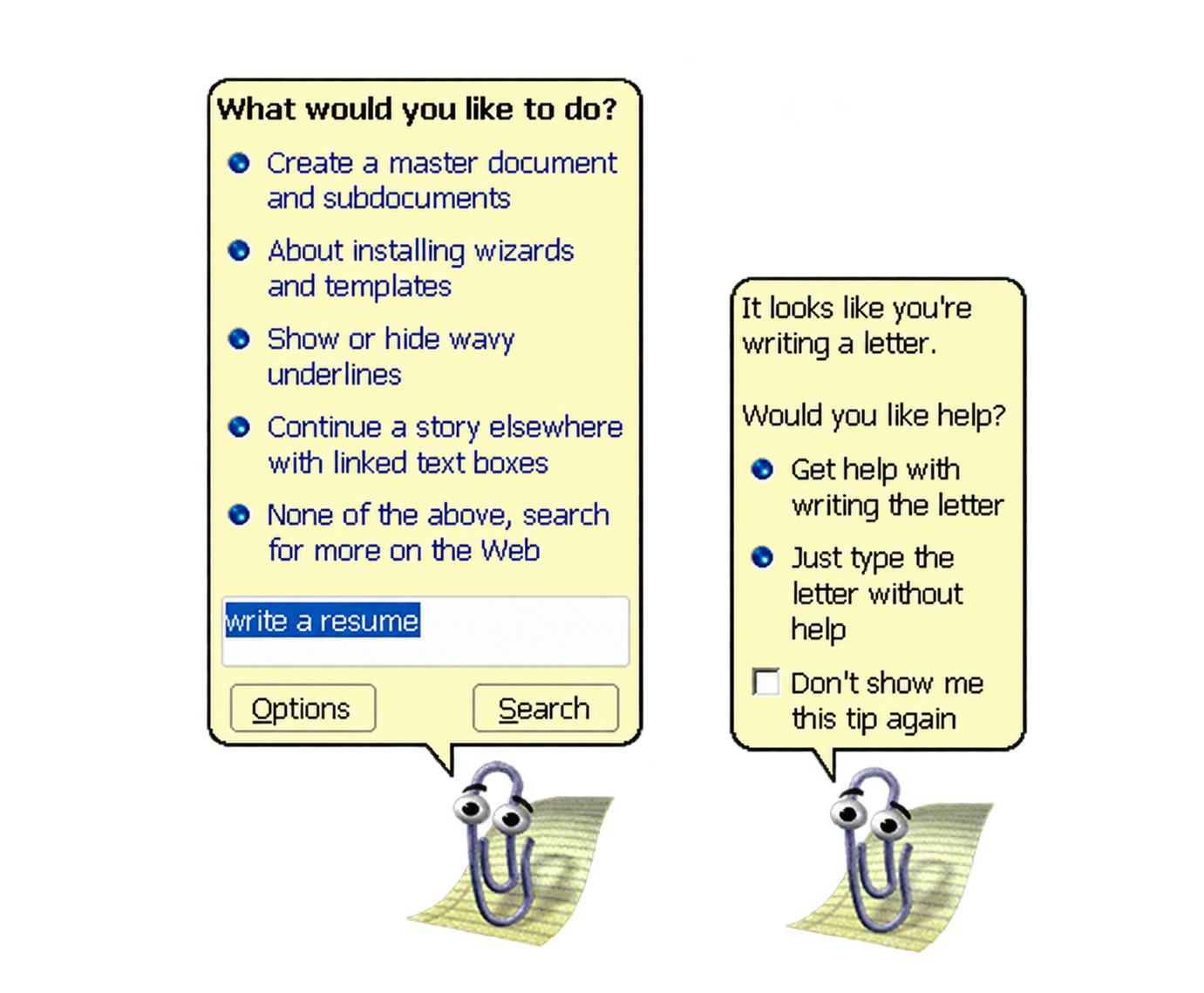
A few words in, I knew exactly what I wanted to say. I was focused. Then a paperclip with eyes appeared in the corner of my screen.
It moved. It watched. It looked delighted to have found me.
“It looks like you’re writing a letter. Would you like help?”
No. Just let me write the damn letter.
Clippy meant well. It was trying to do something we now ask of every AI assistant: recognise the context and offer help at the right moment.
It saw the future. It just didn’t know when to get out of the way.
The assistant that arrived before we were ready
Clippy, officially called Clippit, arrived with Microsoft Office 97.
Its job made sense. Office was becoming more powerful. Useful features were disappearing into menus and dialogue boxes. People needed help finding them.
Instead of making you search for an answer, the software tried to anticipate your question.
That sounds remarkably modern. The execution became famous for the wrong reasons.
Clippy recognised patterns in what you were doing. But recognising a pattern is not the same as understanding what it means.
Start typing a letter, and it could infer that you were writing one. It couldn’t tell whether you needed help.
That small gap shaped its entire story.
With Office XP in 2001, Microsoft turned the assistant off by default. Office 2007 removed it.
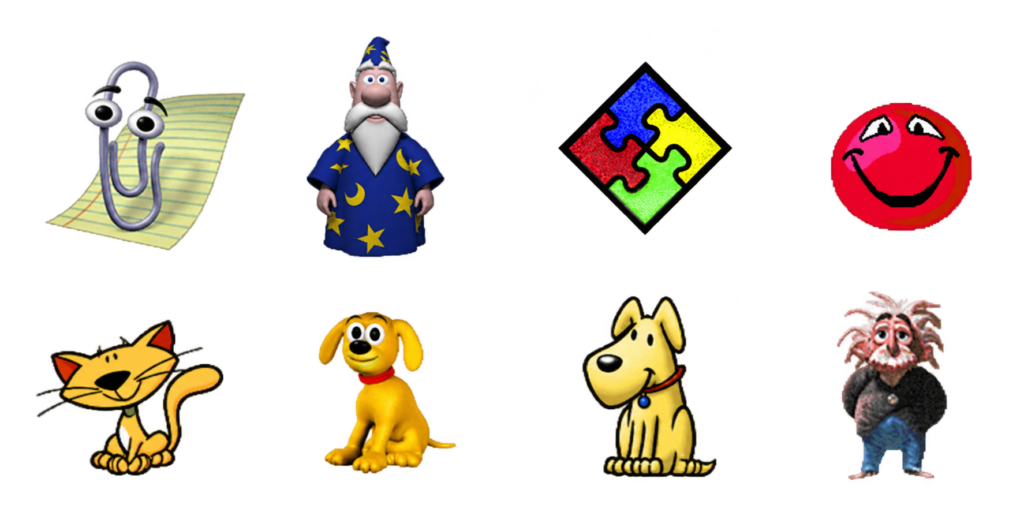
Clippy and the other Office Assistants developed by Microsoft.
The paperclip disappeared. The problem it was trying to solve stayed.
The invisible price of an interruption
Here is something we forget when we design digital tools.
Being useful does not automatically earn you the right to interrupt.
A suggestion can be technically correct and arrive at precisely the wrong moment.
Every time Clippy appeared, you had to stop thinking, read its offer, assess its relevance and decide what to do.
One click could dismiss it. But the click wasn’t the full cost. You had lost your train of thought, even if only for a few seconds.
Repeat that ten, fifty, a hundred times. Assistance begins to feel like another job.
My reading of Clippy’s failure is simple:
It demanded more attention than it saved.
An assistant should reduce the work required to finish a task. It should also protect the concentration required to do it well.
Give software a face, and we expect it to understand us
Clippy had eyes, eyebrows, expressions and a personality. It felt like someone.
And when software behaves like a person, we start expecting human qualities: sensitivity, timing, discretion.
Interrupt me, and I expect a good reason. Watch what I’m doing, and I expect you to understand something about it. Offer help, and I expect that help to matter.
Clippy’s behaviour implied a depth of understanding its technology could not deliver.
Its personality promised more social intelligence than the software could support.
Today’s AI assistants can process natural language, analyse documents, use tools and carry out increasingly complex sequences of actions.
But greater technical capability does not automatically produce better judgement about when to intervene.
An assistant can become far more capable than Clippy and remain just as intrusive.
Behaviour is evidence. It isn’t permission.
Imagine an assistant watching how someone navigates a website.
The pointer hasn’t moved for twenty seconds. Is the visitor confused? Perhaps. Or perhaps they are reading something worth their attention.
They keep returning to the same section. Are they struggling? Maybe they are comparing two ideas.
They scroll straight to the bottom. Are they bored? They might be looking for a source, a conclusion or one specific detail.
An observed behaviour is a clue, not proof of an intention.
AI systems can form increasingly sophisticated hypotheses. They still need to treat those hypotheses as hypotheses, rather than authorisation.
“This person might need help” is a long way from “This person has asked me to help.”
That distinction matters even more when the assistant can act, rather than simply suggest.
Why we’re bringing Clippy back to HiTechStories
An animated paperclip is an unlikely symbol for the future of AI. Its failure, however, raises a design question we still haven’t answered:
How do you offer help without turning it into an interruption?
At HiTechStories, we are experimenting with a new Clippy to help visitors find relevant content, learning paths and tools.
Making it appear is the easy part. Deciding when it should stay invisible is the interesting part.
We want to distinguish signs of possible uncertainty from explicit requests for assistance.
When it offers something, the reason should be understandable and the choice concrete.
“Looking for a place to begin? Start Here introduces the main paths through the site.”
“Want to know what you would receive as a subscriber? Read an edition of the Digest before deciding.”
No mysterious recommendations. No pretence of reading the visitor’s mind. No need to turn every hesitation into another bid for attention.
This is a design goal, not a result we can already claim. We are measuring the experience so we can improve it and learn from the mistakes we will inevitably make.
Clippy gives us a useful place to start.
The best assistant may be the one that knows when to stay quiet
We want more people to discover HiTechStories and become readers.
But persuading someone to stay is different from giving them a reason to return.
An assistant can chase a click or earn trust. It can multiply suggestions or intervene when it has something worth adding.
Technology should make it easier to achieve your goal. It shouldn’t become another presence you have to manage.
Clippy left us a lesson worth keeping:
An assistant earns its place by saving your attention.
In the age of agentic AI, we can take that thought further.
An assistant’s intelligence is measured by what it can do. It is also measured by what it knows to leave alone.
The next time software offers to help, ask yourself more than whether the suggestion is useful.
Is it respecting my attention—or competing for it?
Microsoft and Clippy. Clippy is a character originally developed by Microsoft for its Office suite. The name, character and associated trademarks belong to their respective owners. The HiTechStories reinterpretation is an independent project, neither affiliated with nor endorsed by Microsoft.
Editorial transparency. Parts of this article, including text and images, may have been developed with the support of AI tools under the author’s editorial supervision.
"Artificial Intelligence" has never really convinced me as a name. Not now, and not back when I was an engineering student, when nobody talked about these things.
BLOGGING TIPSInteracting with ReadersInteracting with readers is a fundamental aspect of blogging that extends beyond writing.It’s about building a community and fostering relationships.In my journey as a blogger, engaging with my readers has been…
Nino is listening to a conversation about CVs, algorithms and new opportunities. Then he asks the question nobody put on the agenda.
“Excuse me, but if AI writes my CV and another AI screens it… do I need to turn up for the interview, or can they sort it out between themselves?”
Everyone laughs. Then a suspicion creeps in: perhaps Nino has spotted the point where efficiency risks becoming a conversation with nobody in it.
Two assistants. One person to get to know.
On one side, a candidate can use AI to make a CV clearer, connect experience to the role and prepare for questions. On the other, employers have tools that help them find profiles, organise information and assess potential matches.
This is more than an imaginary scenario. LinkedIn describes AI-assisted search and hiring agents, alongside tools that support applications and CV preparation. That does not mean every hiring process is automated, or that an algorithm alone decides who gets hired. It means AI can be involved on both sides of the table.
So far, there is no scandal. A poorly written CV can hide an excellent professional. An unfocused search can prevent a recruiter from finding them. Improving those steps makes sense.
The problem starts when the quality of the packaging matters more than what is inside.
The perfect CV can be bad news
Imagine an impeccable application: all the right words, no hesitation, every experience aligned with the job description. Is it the portrait of a capable person, or evidence that someone knows how to optimise a document?
The document alone may not tell you. That was true before AI. It makes looking for evidence beyond the text even more important now.
A project explained precisely. A difficult decision and the alternatives rejected. A mistake acknowledged. A result described without claiming the work of an entire team.
These details are less polished than a perfect formula. They make for a more useful conversation.
Translating your experience does not mean inventing it
For an experienced professional, AI can be an excellent editor. It can help explain a complex career to someone outside the industry. It can make experience built around clients, infrastructure, constraints and difficult decisions easier to understand.
The distinction is straightforward: clarify a result you achieved, or claim a result you did not. The first improves communication. The second creates a debt that the actual job will eventually call in.
If your CV promises a skill, you should be able to discuss it. If it cites a number, you should be able to explain the context. If it describes a responsibility, you should know where yours ended and someone else’s began.
What is the employer actually looking for?
The question applies on the other side, too. Before asking AI to find the ideal candidate, a company needs to clarify what makes someone suitable for the work.
What results will they need to deliver? Which skills are essential from day one? Which can be learned? What transferable experience might a literal reading of the requirements overlook?
A candidate may never have used your CRM, for example, but may have spent years managing complex sales involving technical specialists and several decision-makers. How much does familiarity with the software matter compared with the ability to navigate that complexity? The answer depends on the role. It needs to be decided, not left implicit.
Automating a search without clarifying the criteria can accelerate a poorly thought-out selection process. Speed does not fix a bad question.
The interview needs to add something to the CV
If the meeting merely repeats the document, Nino has a point: the two machines might as well keep talking.
An interview becomes valuable when it explores how someone reasons. A realistic case. Incomplete information. A constraint that changes. Permission to ask questions before answering.
The aim is to understand how the person uses what they know. That can include AI tools when the job involves them. Stating beforehand which tools are allowed makes the exercise clearer for both sides.
This is where experience can become visible: in the problem you recognise, the risk you flag, the answer you choose not to give until you understand more.
In the end, Nino does need to turn up
AI can help you attract attention. The conversation helps establish whether that attention has found the right person. On both sides.
Because the candidate is assessing something, too: the clarity of the role, the quality of the questions and the company’s willingness to look beyond a perfect application.
Nino thinks for a moment. Then adds:
“Fine, I’ll come to the interview. Just tell me whether you want a capable person or a CV that tells you what you want to hear.”
In your experience, what question reveals a skill that a perfect CV can hide?
Keep asking useful questions
The HiTechStories Digest brings you perspectives and tools to stay relevant, think independently and use AI without handing over your judgement. Explore the Digest.
Nino’s questions are a narrative device. The examples are hypothetical: they do not describe a verified company case or imply that every hiring system works in the same way.
Start with one recurring task you understand well. Decide what a useful result looks like, give AI the relevant context and review its output yourself. Compare quality and effort with your usual approach. Keep what helps, change what does not, and learn from that small experiment.
Your experience becomes useful when you connect it to someone else’s problem. Show what you noticed, which risk you anticipated or why you chose one option over another. Tools change; those contributions can travel. Make them visible through a real example, rather than years served.
Question AI whenever its answer could shape a decision. Check the important facts, ask what assumptions it makes and compare a plausible alternative. Be especially deliberate when the stakes are high or the context is missing. A fluent answer still needs a reason to be trusted.